

Last updated: September 2026 — added replaceAll, at(), tagged templates, String.raw, and a section on why .length lies.
Every programming language has a set of data types that they support. JavaScript also has datatypes that I explained in this article.
The most used data types are Numbers and Strings/text.
I already covered Numbers in detail in the previous article.
In this article, we will see strings/text datatype of JavaScript in detail.
So what if you want to store your name in some variable, it will be hard to store each character in a separate variable or storing all characters in an array.
C language uses an array of characters to represent a string.
JavaScript provides a separate Data type to represent a sequence of characters i.e. String.
What is a string in JavaScript?
A string is an immutable sequence of 16-bit values. Most of the time each of those values is one Unicode character, but not always — and that exception causes more bugs than anything else about strings, so we will come back to it.
JavaScript's strings (and its arrays) use zero-based indexing. The first 16-bit value is at position 0, the second at position 1, and so on.
So what is the length of the string then?
JavaScript string length is calculated as the number of 16-bit values it contains.
Note:-
JavaScript doesn't have a specific data type to represent a single 16-bit value. It will be represented as a string of length 1.
Javascript uses the UTF-16 encoding of the Unicode character set. The most commonly used Unicode characters fit into 16 bits and can be represented by a single element.
Unicode characters that don't fit into 16 bits are encoded using rules of UTF-16 as a sequence (known as a "surrogate pair") of two 16-bit values. This means a JavaScript string with a single character may return length as 2.
Example:-
let dollar = "$";
let emoji = "🤘";

dollar.length;   // 1
emoji.length;    // 2
From ES6 onward, for...of iterates a string by code point, so a surrogate pair counts as one character:
let count = 0;
for (const char of "🤘") count++;
console.log(count);   // 1

// A classic index loop still sees two halves
let halves = 0;
for (let i = 0; i < "🤘".length; i++) halves++;
console.log(halves);  // 2
That difference matters. for...of and spread understand surrogate pairs; .length, charAt() and index access do not.
String Literals
To use strings directly in a JavaScript program, simply enclose the characters of the string within a matched pair of single/double quotes. In ES6, JavaScript provided backticks (`) to represent a string more simply.
Examples:-
'Hello Devs'
"I'm Ganesh."
`This is ES6 String example.`
The original version of JavaScript required string literals to be written on a single line. To create a long string it was common to concatenate using the + operator.
As of ES5, you can break the string into multiple lines by adding a backslash \ at the end of the line.
ES6 made it easier to write a string across multiple lines with backticks, without adding any special characters like \n.
Examples:-
"Long \
string \
With ES5"

`Long string with
ES6 backtick`
Escape Sequence in String Literals
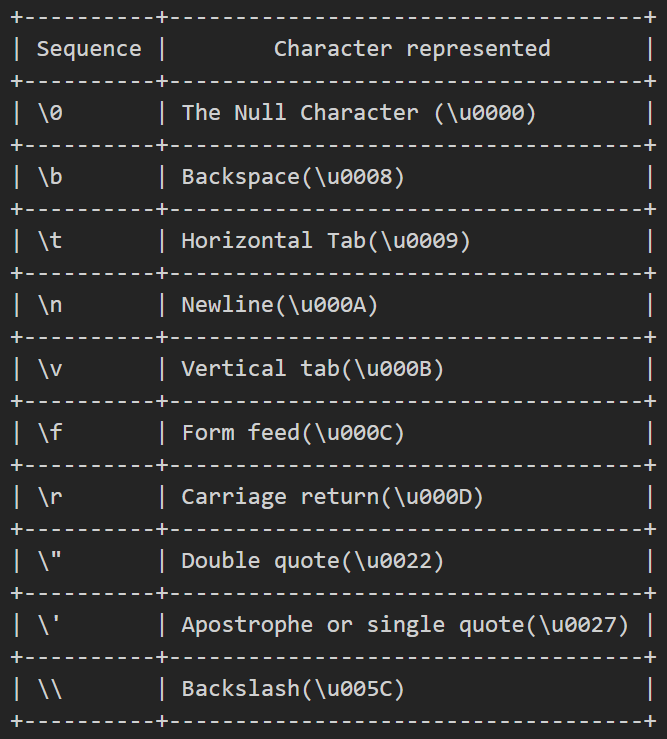
The backslash character \ has a special purpose in JavaScript strings. Combined with the character that follows it, it represents a character that is not otherwise representable within the string.
The backslash allows you to escape from the usual interpretation of the single-quote character. Instead of ending the string, it is treated as a literal single quote.
Example:-
'Hello, dev\'s you\'re Awesome.' // => Hello, dev's you're Awesome.
A table that represents JavaScript escape sequence.
Working with string
If we use the + operator with numbers it adds them, but using + on strings concatenates them.
let text = "Hello " + "world!!!!";
Strings can be compared with === (equality) or !== (inequality). Two strings are equal if they consist of the same sequence of 16-bit values.
Strings can also be compared with <, <=, > and >=. The comparison is done simply by comparing the 16-bit values — which is why "Z" sorts before "a", and why accented characters end up in surprising places. For text a user will read, use localeCompare() instead:
"apple".localeCompare("Banana");   // -1 — sorts the way a person expects
"apple" < "Banana";                // false — raw code-unit comparison
As I mentioned before, the length of a string is the number of 16-bit values it contains.
JavaScript provides a rich API for working with strings.
let str = "Hello, JavaScript Lovers.";

// Getting a portion of the string
str.substring(1, 8);   // "ello, J"   characters from index 1 up to (not including) 8
str.slice(1, 8);       // "ello, J"   same, but slice accepts negative indexes
str.slice(-4);         // "ers."      last 4 characters
str.split(",");        // ["Hello", " JavaScript Lovers."]

// Searching a string
str.indexOf("J");      // 7    position of the first "J"
str.indexOf("44");     // -1   "44" is not present in str
str.lastIndexOf("l");  // 3    position of the last lowercase "l"

// Searching functions from ES6 and later
str.startsWith("He");        // true    checks if the string starts with "He"
str.endsWith("He");          // false   checks if the string ends with "He"
str.includes("JavaScript");  // true    checks if the string contains "JavaScript"

// Modifying a string
str.replace("JavaScript", "tea");     // "Hello, tea Lovers."   replaces the FIRST match only
str.replaceAll("l", "L");             // "HeLLo, JavaScript Lovers."   replaces every match (ES2021)
str.toLowerCase();   // "hello, javascript lovers."
str.toUpperCase();   // "HELLO, JAVASCRIPT LOVERS."

// Inspecting individual characters
str.charAt(0);               // "H"   character at position 0
str.at(0);                   // "H"   same, but at() also accepts negatives (ES2022)
str.at(-1);                  // "."   last character — no str.length - 1 needed
str.charAt(str.length - 2);  // "s"   2nd last character, the old way
str.charCodeAt(0);           // 72    the 16-bit code unit at position 0
str.codePointAt(0);          // 72    ES6 — same here, but see the emoji example below

// String padding functions from ES2017
"xyz".padStart(6);        // "   xyz"   pad the left until the length is 6
"xyz".padEnd(6);          // "xyz   "   pad the right until the length is 6
"xyz".padStart(6, "*");   // "***xyz"   pad with * instead of spaces
"xyz".padEnd(6, "*");     // "xyz***"

// Space trimming — trim() from ES5, the others from ES2019
"   xyz   ".trim();        // "xyz"      removes spaces from both ends
"   xyz   ".trimStart();   // "xyz   "   removes spaces from the start
"   xyz   ".trimEnd();     // "   xyz"   removes spaces from the end

// More string methods
str.concat("!!");   // "Hello, JavaScript Lovers.!!"   same as the + operator
"*".repeat(5);      // "*****"   repeats the characters n times
Two of those deserve a closer look, because both replaced a workaround people still write out of habit.
replaceAll — ES2021
replace only swaps the first match when you give it a string:
const path = "src/app/components/button";

path.replace("/", "-");      // "src-app/components/button"
For years the fix was a global regex, which meant escaping any character the regex engine cares about:
path.replace(/\//g, "-"); // "src-app-components-button"
replaceAll does it directly:
path.replaceAll("/", "-"); // "src-app-components-button"
One rule: if you pass a regex to replaceAll, it must have the g flag, or it throws. That is deliberate — a non-global regex would have made the method name a lie.
"a.b".replaceAll(/\./, "-");
// TypeError: String.prototype.replaceAll called with a non-global RegExp argument
at() — ES2022
Bracket access cannot count from the end, so reading the last character always looked like this:
const name = "Ganesh";
name[name.length - 1];   // "h"
at() accepts negative indexes:
name.at(-1);    // "h"
name.at(0);     // "G"
name.at(-99);   // undefined — out of range, no error
Note that brackets do not do this at all — name[-1] is undefined, because -1 is just a property name that does not exist on the string. Arrays got at() at the same time and it behaves the same way there.
NOTE:-
JavaScript Strings are immutable. Methods like replace() or toUpperCase() return a new string with the resulting value. The original is never touched.
Template Literals
In ES6 and later, strings can be written using backticks.
let str = `Hello there.`;
This is more than just another string literal syntax.
Template literals can include arbitrary JavaScript expressions. The final value is computed by evaluating any included expression and converting the result to a string.
Example:-
`Addition of 2 + 4 is ${2 + 4}.` // "Addition of 2 + 4 is 6."
Tagged Templates
A template literal can have a function in front of it. When it does, that function receives the pieces instead of the finished string:
function highlight(strings, ...values) {
  return strings.reduce(
    (out, s, i) => out + s + (i < values.length ? `**${values[i]}**` : ""),
    ""
  );
}

const user = "Ganesh";
const count = 3;

highlight`${user} has ${count} unread messages`;
// "**Ganesh** has **3** unread messages"
strings is an array of the literal text chunks and values holds everything that was inside ${}. The function decides what to do with them — which is how libraries build SQL query builders that escape their parameters, and how CSS-in-JS libraries turn a template into a class name.
String.raw
String.raw is a built-in tag that gives you the string before escape sequences are processed:
`C:\name`             // "C:" then a newline, then "ame" — \n became a line break
String.raw`C:\name`   // "C:\name"
That makes it useful for Windows paths and regex patterns, where backslashes are meaningful and doubling them all up is noise:
String.raw`\d+\.\d+` // "\d+\.\d+"
.length does not count characters
This is the one thing to remember about JavaScript strings, and it follows directly from the UTF-16 note at the top: .length counts 16-bit code units, not characters a person would recognise.
"café".length;   // 4   fine
"👋".length;      // 2   one emoji, two code units
Any character outside the basic range is stored as a surrogate pair, and every index-based operation splits it in half:
"👋".at(0);        // "\uD83D" — half an emoji, renders as garbage
"👋".split("");    // [ "\uD83D", "\uDC4B" ]
Spread and for...of iterate by code point, so they get it right:
[..."👋"].length; // 1
And this is where codePointAt earns its place over charCodeAt:
"👋".charCodeAt(0);    // 55357   just the first half of the pair
"👋".codePointAt(0);   // 128075  the actual character
There is a second trap. Two strings can look identical and not be equal, because Unicode allows more than one way to write the same character:
const a = "café";         // é as a single character
const b = "cafe\u0301";   // e followed by a combining accent

a === b;             // false
a.length, b.length;  // 4, 5
normalize() converts both to the same form:
a.normalize("NFC") === b.normalize("NFC"); // true
Normalise before comparing or storing anything a user typed — names, search queries, usernames. Otherwise two identical-looking usernames can both be registered, and neither user can log in reliably.
And for genuinely correct character counting — emoji with skin tone modifiers, family emoji, scripts with combining marks — even code points are not enough:
"👨👩👧👦".length; // 11
[..."👨👩👧👦"].length; // 7
const seg = new Intl.Segmenter("en", { granularity: "grapheme" });
[...seg.segment("👨👩👧👦")].length; // 1
Intl.Segmenter is the only one that gives the answer a person would give. Use it for character limits in a UI — a tweet counter, a bio field — where "3 characters left" needs to match what the user actually sees.
That's it for the strings in JavaScript.
I hope you liked this article.
In the next article of this series, I will be covering JavaScript Expressions.
Hope you like it, if yes **like & share.**
Thanks for your time.
Happy coding….
About the author
Hello! I'm a dedicated software developer with a passion for coding and a belief in technology's impact on our world. My programming journey started a few years ago and has reshaped my career and mindset. I love tackling complex problems and creating efficient code. My skills cover various languages and technologies like JavaScript, Angular, ReactJS, NodeJs, and Go Lang. I stay updated on industry trends and enjoy learning new tools. Outside of coding, I cherish small routines that enhance my workday, like sipping tea, which fuels my creativity and concentration. Whether debugging or brainstorming, it helps me focus. When I'm not coding, I engage with fellow developers. I value teamwork and enjoy mentoring newcomers and sharing my knowledge to help them grow. Additionally, I explore the blend of technology and creativity through projects that incorporate art and data visualization. This keeps my perspective fresh and my passion alive. I'm always seeking new challenges, from open-source contributions to hackathons and exploring AI. Software development is more than a job for me—it's a passion that drives continuous learning and innovation.
Comments
Join the discussionVery nicely written. Didn't really know about Surrogate strings.
Thank you, Abhishek 🙏(Surrogate Pair). 😁
JavaScript - Basics to Advance
This series will cover everything you need to know about JavaScript from basics to advanced. Please stick with us and take your JS code quality and productivity to another level #JavaScript #JS


