# JavaScript Strings
Every programming language has a set of data types that they support.
JavaScript also has datatypes that I explained in [this article](https://blog.ganeshjaiwal.dev/types-values-and-variables-in-javascript).
The most used data types are Numbers and Strings/text.
I already covered Numbers in detail in the [previous article](https://blog.ganeshjaiwal.dev/numbers-in-javascript) .
In this article, we will see strings/text datatype of JavaScript in detail.
So what if you want to store your name in some variable, it will be hard to store each character in a separate variable or storing all characters in an array.
C language uses an array of characters to represent a string.
JavaScript provides a separate Data type to represent a sequence of characters i.e. **String**.
## What is a string in JavaScript?
The string is an immutable sequence of 16-bit values, each of which represents a Unicode character.
JavaScript’s strings(and its array) use zero-based indexing.
The first 16-bit value is represented at position 0, the second 16-bits at position 1, and so on.
### So what is the length of the string then?
JavaScript string length is calculated as the number of 16-bit values it contains.
#### Note:-
***JavaScript doesn’t have a specific data type to represent a single 16-bit value.
It will be represented as a string of length 1.***
> Javascript uses the UTF-16 encoding of the Unicode character set.
The most commonly used Unicode characters are fit into 16-bit and can be represented by a single element.
Unicode characters that don’t fit into 16-bit are encoded using rules of UTF-16 as a sequence(known as “Surrogate pair”) of two 16-bit values. This means JavaScript string with a single character may return length as 2.
**Example**:-
```
let dollar = “$”;
let emoji = “🤘”;
dollar.length; // 1
emoji.length; // 2
```
In ES6 if we iterate string with for loop it considers 2 16-bit values as a single character if it is “Surrogate pair”.
### String Literals
To use strings directly into the JavaScript program, simply enclose the characters of the string within a matched pair of single/double quotes.
In ES6 JavaScript provided backticks(`) to represent a string more simply.
**Examples**:-
```
‘Hello Devs’
“I’m Ganesh.”
`This is ES6 String example.`
```
The original version of JavaScript required string literals to be written on a single line. And to create a long string it is common to concatenating a string using the + operator.
As of ES5, you can break the string into multiple lines by adding a backslash(\) at the end of the line.
The ES6 made it easier for devs to write a string into multiple lines with backticks, without adding any special characters like(\n).
**Examples**:-
```
“Long \
string \
With ES5”
`Long string with
ES6 backtick`
```
### Escape Sequence in String Literals
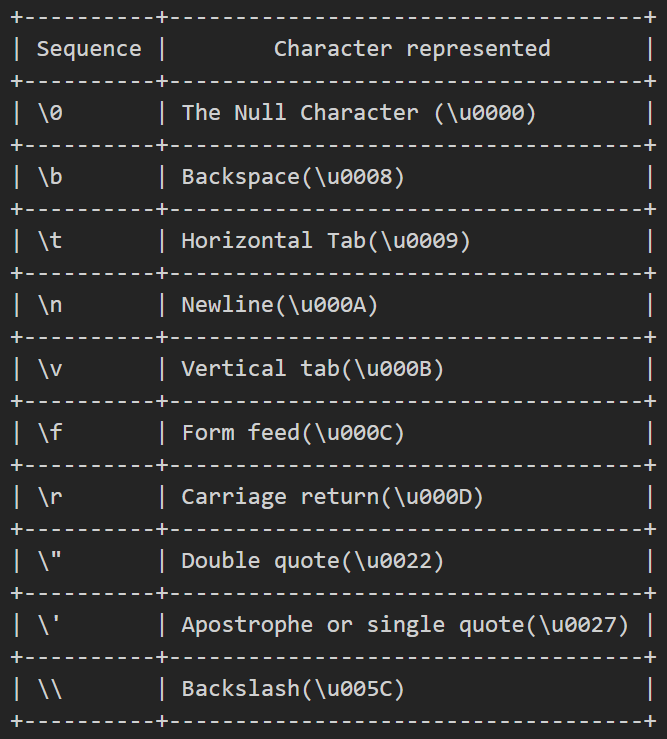
The backslash character (\) has a special purpose in Javascript strings. Combined
with the character that follows it, it represents a character that is not otherwise representable within the string.
The backslash (\) allows you to escape from the usual interpretation of the single-quotes character. Instead of using it as the end of the string, you use it as a single quote.
**Example**:-
```
‘Hello, dev\’s you\’s Awesome.’ // => Hello, dev’s you’re Awesome.
```
A table that represents JavaScript escape sequence.
### Working with string
If we use the + operator with numbers it adds them, but using the + operator on string results in concatenating 2 strings.
```
let text = “Hello ” + “world!!!!”;
```
A string can be compared with ===(equality) or !==(inequality) operators, two strings are equal if they consist of the same sequence of 16-bit values.
A string can also be compared with the <, <=, >, and >= operators.
String comparison is done simply by comparing the 16-bit values.
As I mentioned before the length of a string is the number of 16-bit values it contains.
JavaScript provides a rich API for working with string.
```
let str = "Hello, JavaScript Lovers.";
// Getting portion of the string
str.substring(1, 8); // "ello, J" charates from 1 to 8
str.slice(1, 8); // "ello, J" charates from 1 to 8
str.slice(-4); // "ers." last 4 characters
str.split(','); // ["Hello", " JavaScript Lovers."]
// Searching a string
str.indexOf('J'); // 7 Position of first “J”
str.indexOf('44'); // -1 “44” not present in str
str.lastIndexOf('l'); // 3 Position of “l” from last
// Searching function of ES6 and later
str.startsWith('He'); // true Checks if string starts with “He”
str.endsWith('He'); // false Checks if string ends with “He”
str.includes('JavaScript'); // true Checks if string contains “JavaScript”
// Modifying string
str.replace('JavaScript', 'tea'); // "Hello, tea Lovers." Replaces the maching part of string
str.toLowerCase(); // "hello, javascript lovers." Converts string to lower case
str.toUpperCase(); // "HELLO, JAVASCRIPT LOVERS." Converts string to upper case
// Inspecting individual 16-bit characters of string
str.charAt(0); // “H” Returns character at position 0
str.charAt(str.length - 2); // “s” Getting 2nd last character of string
str.charCodeAt(0); // 72 16-bit number at position 0
str.codePointAt(0); // 72 ES6 - this world for codepoints > 16-bits
// String padding functions in ES2017
"xyz".padStart(6); // " xyz" add spaces on the left of string and make length 6
"xyz".padEnd(6); // "xyz " add spaces on the righ of string and make length 6
"xyz".padStart(6, "*"); // "***xyz" add * as padding
"xyz".padEnd(6, "*"); // "xyz***" add * as padding
// Space trimming functions trim() of ES5 and others from ES2019
" xyz ".trim(); // "xyz" Removes empty spaces from start and end
" xyz ".trimStart(); // "xyz " Removes empty spaces from start
" xyz ".trimEnd(); // " xyz" Removes empty spaces from end
// More string methods
str.concat("!!"); // "Hello, JavaScript Lovers.!!" Same as + operator
"*".repeat(5); // "*****" Repetes characters n times
```
#### NOTE:-
JavaScript Strings are immutable. Methods like replace() or toUpperCase() returns new string with resulting value.
### Template Literals
In Es6 and later, strings are represented using backticks.
```
let str = `Hello there.`;
```
This is more than just another string literal syntax.
Template literals can include arbitrary javascript expressions. The final value of string literal in backtick is computed by evaluating any included expression, converting the values of those expressions to a string.
Example:-
```
`Addition of 2 + 4 is ${2 + 4}.` // "Addition of 2 + 4 is 6."
```
That’s it for the strings in JavaScript.
I hope you liked this article.
In the next article of this series, I will be covering Javascript Expressions.
**Hope you like it, if yes \*\*like & share.\*\***
**Thanks for your time.**
**Happy coding….**
***[← Numbers in JavaScript](https://blog.ganeshjaiwal.dev/numbers-in-javascript) [JavaScript Expressions →](https://blog.ganeshjaiwal.dev/javascript-expressions)***